
Wedding Planner by MyWed
Wedding Planner AppEvents
4.4147.00 Reviews
- Version
- 5.11.367
- Installs
- 1.00M
- Age Rating
- Everyone
Screenshots

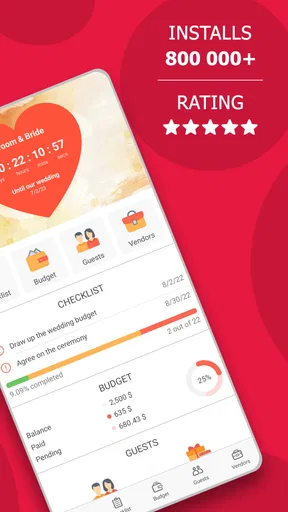
Our Review of Wedding Planner by MyWed
 Analysis by Appyee
I judge a wedding-planning app by whether it helps a couple make decisions together, not just collect ideas. The important questions are practical: can we keep track of people, tasks, and spending in one place, and will we still find it useful when plans change? Wedding Planner by MyWed is aimed at those everyday jobs. I’d consider it when a couple wants a shared planning hub, but I wouldn’t assume an app can replace conversations, careful budgeting, or professional help where those are needed.
Choose it for coordination, not a substitute for every decision
The clearest reason to try this free events app is its focus on a few recurring planning pressures: guest details, to-dos, expenses, and involving a partner. That combination can be useful when one person has been keeping everything in messages or notes and the other needs a clearer way to see what still needs attention. The app is made by Wedding Planner App, and its name describes its purpose plainly: it is a planning tool rather than a wedding inspiration magazine or a general calendar.
Before moving information into it, I’d decide what you want it to be responsible for. For example, you might use it to keep the working guest list and task progress together, while leaving final vendor agreements and important documents in the places you already store them. This small boundary helps avoid a common planning headache: assuming that every detail is safely captured just because it appears in one app. Treat the app as a coordination aid, and verify consequential arrangements directly with the people involved.
Why a shared plan can beat scattered notes
The guest list, tasks, and expenses are connected in real life. A change in attendance can affect the budget, and a budget decision can change what still needs to be arranged. Keeping those areas under one planning routine can make it easier to notice the connection rather than treating each as a separate conversation. The useful habit is to review them together: check who is still unconfirmed, look at outstanding tasks, then revisit spending before agreeing to another commitment.
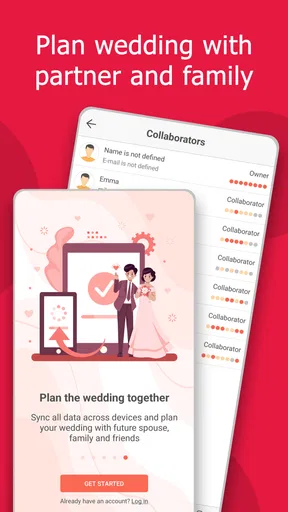
Inviting your partner into the planning process also matters for more than convenience. It gives both people a chance to see the same working picture before a decision becomes a surprise. I’d use it for a brief weekly check-in rather than expecting either person to monitor the app constantly. A short review of open tasks and unsettled expenses can turn a vague “we should sort that out” into a specific next step, without making wedding preparation feel like another full-time job.
Getting Started with Wedding Planner by MyWed
First things first, the Wedding Planner by MyWed app is super easy to download. Whether you’re on an Android or iOS device, just head over to your app store, and you’ll find it ready for action. Once installed, the clean, user-friendly interface greets you, guiding you smoothly into the world of wedding planning without any hiccups.
Features You'll Love
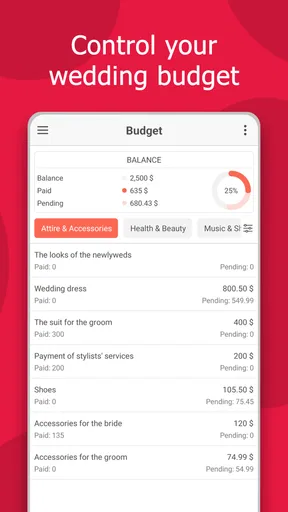
This app is packed with features that cater to every aspect of wedding planning. You can easily manage your budget with its detailed budgeting tool, which is a lifesaver if you’re trying to keep costs under control. And let’s be honest, who isn’t?
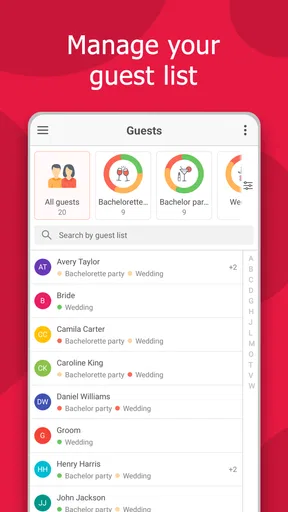
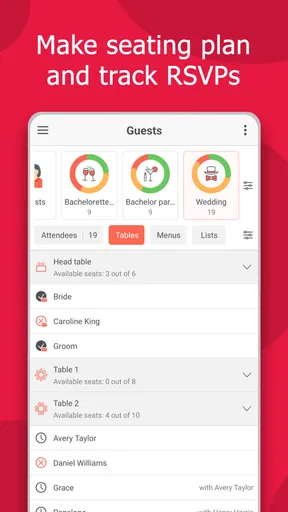
Another standout feature is the guest list manager. You can import contacts directly from your phone, and it even allows for grouping and sending invites. The seating arrangement tool is a cherry on top, making it super easy to visualize where everyone will sit without the need for paper and pen.
What really impressed me was the vendor management tool. You can browse through a comprehensive list of vendors, complete with reviews and ratings from other couples. It’s like having a wedding planner in your pocket who’s always ready with recommendations and insights.
Planning the Big Day
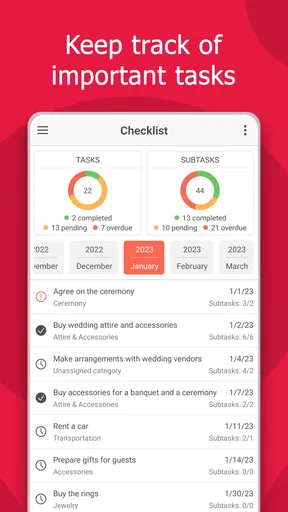
The checklist feature in the app is nothing short of a blessing. It breaks down the planning process into manageable tasks, ensuring you don’t forget anything crucial. From booking the venue to ordering the cake, it’s all laid out in a clear, concise manner. Plus, with notifications and reminders, the app keeps you on track without feeling overwhelmed.
For those looking to get creative, the inspiration gallery is a goldmine. It’s filled with beautiful images and ideas to help you nail the aesthetic of your wedding. You can save your favorites and even share them with your wedding party or vendors directly through the app.
Who will get the most from it?
Although the app can support a broad range of celebrations, the strongest fit is a couple dividing planning duties and needing a shared place to keep the moving parts visible. It is available at no charge to start, has an Everyone age rating, and has reached over a million installs. Its average is 4.4 from around twelve thousand ratings, with 147 written reviews, so plenty of users have tried it, though those figures alone cannot tell you whether its workflow will suit your particular wedding.
A realistic use case is a couple planning after work: one person updates which guests have replied, while the other checks the next tasks and the current spending picture before they agree on a decision. Rather than reopening old message threads, they can use the same planning space as a prompt for what to discuss. The best payoff is not simply having more information; it is reducing the chance that one partner is making plans from a different version of events.
Small workflows that make the plan more useful
I’d begin by adding only the information you expect to use soon. Start with the people you need to contact and the next few concrete tasks, then add detail as decisions become real. Entering every possible idea at once can make a planning tool feel like another backlog. A short, current list is more useful than a sprawling one neither partner wants to review.
For expenses, agree together on what counts as a committed cost and what is still only an estimate. That distinction can prevent a rough idea from being mistaken for a final decision. Before a purchase or booking, check the relevant amount and discuss who will follow up; after the decision, update the plan promptly. The app can help organize the conversation, but the couple still needs to decide how to handle deposits, changes, and records outside it.
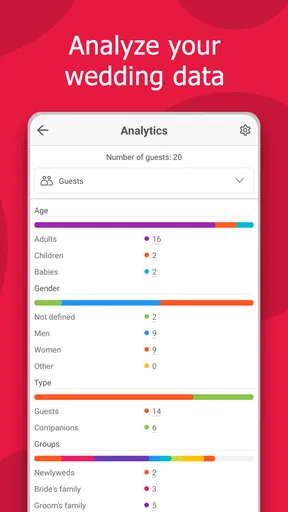
The guest list is also easier to manage if you settle on a simple convention early. Decide how you will record households, plus-ones, and uncertain replies, and use the same approach consistently. When the list changes, check whether that affects any other decisions rather than treating each edit as isolated. If you use contact importing, review the entries before acting on them; a phone contact is not necessarily the right invitation name or the person who should receive the message.
Tasks work best when each one has a clear next action and an owner. Instead of a broad item such as “sort flowers,” make the task something you can actually complete, such as comparing options or confirming a choice. This is a planning method, not a special app feature, but it makes a checklist much more useful and helps two people avoid assuming the other has taken care of something.
Where another approach may be better
Compared with a basic notes app, a wedding-focused planner gives the work a more relevant structure: guests, expenses, and wedding tasks belong together rather than being scattered across unrelated notes. A shared calendar may still be better for appointments and deadlines that need to appear alongside work and family commitments. Many couples will find that a planner and calendar serve different purposes, rather than needing to choose just one.
A spreadsheet can be the better fit for someone who wants to build custom columns, formulas, or a very particular budget layout. It can also be easier to inspect on a larger screen. The trade-off is that a spreadsheet may require more setup and discipline from both partners, while an app designed around wedding planning may feel more approachable for routine updates. If you already have a system that both people use consistently, switching just for the sake of having a dedicated app may add friction instead of removing it.
Likewise, couples working with a professional planner may prefer to follow that planner’s established process and use this app only for their own guest and task coordination, if it fits. It is not automatically the right choice for a team that needs a bespoke workflow or formal project oversight. If one partner will never open the app, a shared tool will not create collaboration by itself; a simple weekly conversation and a clearly agreed owner for each decision may work better.
Costs, setup, and the effort of switching
The app is free to download, with optional in-app purchases ranging from $1.49 to $59.99 per item. I’d start by deciding whether its basic planning approach actually helps before paying for anything. Since purchases are item-based, check what a specific option includes and whether it solves a real problem for you; don’t treat an upgrade as necessary simply because planning feels stressful. The current version is 5.10.365, and it supports Android 8.0 or later.
Moving from an existing notes file or spreadsheet takes time, so I would not transfer every old idea just to make the app feel complete. Bring over current guest information, active tasks, and the expense details you still need to manage. Keep the old record until you have checked that the working essentials are in the new routine. This is especially sensible if both partners have been updating different copies: agree on which version is authoritative before you start, or you may carry the same confusion into a new tool.
One question couples often have is whether they need to plan everything inside the app. I wouldn’t. Use it for the parts that benefit from being reviewed together, and keep sensitive or formal records wherever you normally manage them. Another practical question is whether one person can use it alone: the planning functions can still help an individual, but the shared value is strongest when both partners agree to check and update the same plan.
Why It Stands Out
What sets Wedding Planner by MyWed apart is its personal touch. The app feels like it’s built with real people in mind, understanding the emotional rollercoaster that is wedding planning. It combines practicality with a touch of personalization, allowing you to tailor your planning experience to suit your needs.
And let’s not forget the community aspect. The app includes forums and chat options where you can connect with other couples. It’s a wonderful way to share experiences, get advice, or simply vent your frustrations to someone who gets it.
My recommendation
My advice is to try it if the immediate problem is coordination: too many small tasks, a guest list that needs attention, spending decisions that should be visible to both partners, or a partner who wants to be included without taking over every detail. Give it a modest role at first, then keep using it only if it reduces the effort of planning. That test is more useful than trying to make any app hold every thought about the wedding.
I’d skip it if you prefer a highly customized spreadsheet, already have a reliable shared system, or need a professional planner’s workflow to be the single source of truth. It may also be a poor fit if one partner dislikes maintaining apps and there is no agreement about who will update the plan. The tool can make a shared process easier, but it cannot settle differences about priorities or ensure that a task gets done without someone taking responsibility.
Final Thoughts
In a nutshell, Wedding Planner by MyWed is a comprehensive, user-friendly app that streamlines the wedding planning process. From budgeting and guest lists to vendor management and inspiration galleries, it covers all bases. Whether you’re planning a small intimate gathering or a grand celebration, this app will be your trusty sidekick.
So, if you’re feeling the wedding planning jitters, give this app a try. It’s like having a professional wedding planner right at your fingertips, minus the hefty price tag. Happy planning!
Verdict
Strengths of Wedding Planner by MyWed
- User-friendly interface for easy navigation.
- Comprehensive checklist for wedding planning.
- Customizable budget tracker for expenses.
- Collaboration feature for sharing with partners.
- Vendor recommendations based on location.
Limitations of Wedding Planner by MyWed
- Limited customization for personal themes.
- In-app purchases required for full features.
- Occasional ads can be disruptive.
- Some users report slow customer support.
- Limited integration with external calendars.
Other Releases by Wedding Planner App
View All
Event Planner: Birthday, Party
Events4.1
Similar Picks in This Category
View All
Easy Quran Mp3 Audio Offline
Muslim Worldapp4.7

Invitation Maker: Cards & RSVP
Greetings Island4.9

StubHub - Live Event Tickets
StubHub4.3

Fever: Events & Tickets
Fever Labs4.7

Epic Freebie Games Radar
Arioch Pds - Apps & Games4.4

Invitation card Maker, Design
Splendid App Maker4.9
Frequently Asked Questions
What features does Wedding Planner by MyWed offer?
Wedding Planner by MyWed provides a comprehensive suite of tools to help plan your perfect wedding. It includes budget tracking, customizable checklists, a guest list manager, and vendor management. Additionally, users can explore inspiration galleries and access tips from wedding experts, making it a one-stop solution for all planning needs.
Is Wedding Planner by MyWed available on both Android and iOS?
Yes, Wedding Planner by MyWed is available for download on both Android and iOS platforms. The app ensures a seamless experience across devices, allowing you to access your wedding details anytime, anywhere, whether you are on your smartphone or tablet.
Can I collaborate with my partner or family members on the app?
Absolutely! Wedding Planner by MyWed allows you to collaborate with your partner, family, or friends by sharing your planning details. This feature ensures everyone involved can stay updated and contribute, making the planning process more interactive and less stressful.
How does the app help with budget management?
The app offers a robust budget management tool that helps you track expenses and allocate funds effectively. You can set your total budget, categorize expenses, and receive alerts if you're nearing your budget limits, ensuring you stay financially on track while planning your wedding.
Is there customer support available if I encounter issues with the app?
Yes, Wedding Planner by MyWed provides customer support to assist users with any issues or questions. You can reach out through the app’s support section, where you’ll find FAQs, contact information, and even live chat options to resolve your concerns promptly.
